Unified Communications
Unified Communications: Save Costs and Streamline Remote Meetings
Your team shouldn't have to juggle five different apps just to talk to each other. Unified Communications combines your phone system, video meetings, instant messaging, and collaboration tools into a single, integrated platform. So, your people can work faster, respond quicker, and stay connected wherever they are.
At Wahaya IT, we implement Unified Communications solutions tailored to your business's unique operations. No complicated setups. No mysterious bills. Just reliable communication tools that keep your team productive and your customers happy.

What Is Unified Communications (And Why Should You Care)?
Unified Communications, or UC, is precisely what it sounds like: bringing all your communication channels together in one place.
Instead of switching between your desk phone, a video meeting app, email, chat, and voicemail, everything lives on a single platform. You can start a conversation in chat, escalate it to a voice call, share your screen, and loop in a colleague—all without changing applications or losing context.
For your business, this means faster decisions, fewer missed messages, and a team that can collaborate without friction. It means your remote workers have the same tools as your office staff. And it means you're not paying for six different services that don't talk to each other.

Why Your Business Needs Unified Communications
Communication breakdowns cost your business money. When your sales team can't quickly connect with a prospect, when your support staff misses a customer callback, when your managers can't reach field workers—that's lost revenue and damaged relationships.
Traditional phone systems weren't designed for the way teams work today. They're tied to desks, limited to voice calls, and impossible to scale without expensive hardware upgrades. Your people need flexibility to work from the office, from home, or from a client site without losing access to their business line.
Unified Communications solves these problems by making communication location-independent and device-agnostic. Your business number rings simultaneously on your desk phone, computer, and mobile phone. You can check if a colleague is available before making a call. You can join a video meeting from anywhere with internet access.
The result? Your team responds faster, collaborates more effectively, and delivers more professional experience to your customers—without being tied to their desks.
Our Unified Communications Platform: Built on Proven Technology
We implement Unified Communications solutions using two industry-leading platforms: Microsoft Teams and 3CX. Both offer enterprise-grade reliability with the flexibility your business needs, and we'll help you choose the one that fits your specific requirements.
Microsoft Teams: Integrated with Your Existing Ecosystem
If your organization already uses Microsoft 365, Teams Phone System is a natural extension of the tools you're using every day. Your phone system lives right inside the Teams application your staff already knows, with no separate app to learn or manage.
Teams brings voice calling, video conferencing, chat, and file sharing into one unified experience. Your employees can view presence status, share documents during a call, and seamlessly transition between communication methods. And because it's part of your Microsoft 365 subscription, you benefit from the same security controls and compliance features protecting your email and files.
We handle the entire Teams Phone System implementation—from porting your existing phone numbers to configuring auto-attendants, call queues, and routing rules. Your team gets enterprise phone features without enterprise complexity.
3CX: Powerful, Flexible, and Cost-Effective
For businesses that want more control over their communication platform or don't use Microsoft 365, 3CX delivers a robust Unified Communications solution with exceptional flexibility and lower long-term costs.
3CX offers all the features you'd expect from an enterprise phone system—auto-attendants, call queuing, call recording, voicemail-to-email, and sophisticated call routing—plus video conferencing, web chat, and CRM integration. It works seamlessly across Windows, Mac, iOS, and Android, so your team has consistent access regardless of device.
One of 3CX's most significant advantages is its open standards approach. Unlike proprietary systems that lock you into expensive hardware, 3CX works with a wide range of SIP-compatible phones and devices. This gives you choice, flexibility, and predictable costs as you grow.
We deploy 3CX both on-premises and in the cloud, depending on your specific needs for control, compliance, and budget. Either way, you get a system that scales your business without forcing you into rigid packages or surprise fees.
Wahaya IT employs the 3CX communication phone system to facilitate seamless and efficient communication. 3CX allows us to streamline your operations, enhancing internal and external interactions. With 3CX, Wahaya IT ensures reliable connectivity and supports various communication needs.
Security and Compliance: Protecting Your Business Communications
Your business communications often contain sensitive information, including customer data, financial discussions, strategic planning, and personnel matters. Protecting these conversations isn't optional, especially if you operate in a regulated industry.
We build security into every layer of your Unified Communications deployment, from encrypted voice calls to authenticated access controls.
End-to-End Encryption
All voice, video, and messaging traffic in your UC system is encrypted both in transit and at rest. This means your conversations can't be intercepted as they travel across the internet, and stored recordings are protected from unauthorized access.
For businesses handling sensitive data, this encryption is table stakes. Whether you're discussing patient information, financial records, or proprietary business strategies, your communications remain private and secure.
Access Controls and Authentication
Not everyone in your organization needs access to every feature or recording. We implement role-based access controls that limit what each user can see and do based on their job function.
Multi-factor authentication adds an extra layer of protection, ensuring that only authorized users can access the system—even if a password is compromised. Integration with your existing Active Directory or identity management system ensures that your IT team maintains centralized control over user access.
Compliance Recording and Retention
If your business operates under regulatory requirements such as HIPAA, PCI-DSS, SOC 2, or financial services regulations, you may need to record, retain, and produce certain communications upon demand.
We configure your UC platform to automatically record specific calls or users, store those recordings securely with tamper-proof logging, and maintain them for your required retention period. When auditors come knocking, you'll have the documentation you need—organized, searchable, and immediately accessible.
Monitoring and Threat Detection
We continuously monitor your UC infrastructure for unusual activity, including failed login attempts, unauthorized configuration changes, or suspicious calling patterns that may indicate fraud or a compromised account.
Early detection enables us to respond promptly before a security incident escalates into a business crisis. If someone tries to use your system to place expensive international calls or access data they shouldn't, we catch it quickly and shut it down.
Get Unified Communications That Actually Work for Your Business
Your team needs communication tools that simplify work, not complicate it. Unified Communications streamlines everything, eliminating missed messages and productivity barriers. Whether supporting remote work, improving customer response, or meeting compliance needs, Wahaya IT provides UC solutions tailored to your business. We'll help you pick between Microsoft Teams and 3CX, deploy user-friendly hardware, and ensure your communications are secure. More than just a phone system, you’ll have a scalable platform to support your team and keep your business competitive.
Key Features That Make Your Business Run Better
Presence and Availability Status
See immediately whether a colleague is available, busy, in a meeting, or away. No more playing phone tag or interrupting someone who's heads-down on deadline work.
Softphone Applications
Turn your computer or mobile device into a full-featured business phone. Make and receive calls from your business number anywhere you have internet access—no desk phone required.
Auto-Attendants and Call Routing
Professional automated menus greet callers and route them to the correct department, freeing up your receptionist's time. Create custom routing rules based on time of day, caller ID, or department availability.
Call Queuing and Distribution
Manage incoming call volume with intelligent queuing that distributes calls fairly among available agents. Callers hear hold music and announcements instead of busy signals, and your team handles calls in the order received.
Video Conferencing
Host high-quality video meetings with screen sharing, chat, and recording capabilities built right into your UC platform—no need for separate Zoom accounts or GoToMeeting subscriptions.
Voicemail-to-Email
Receive voicemail messages as audio files delivered straight to your email inbox. Listen from anywhere, forward to colleagues, and never miss important messages when you're away from your desk.
Mobile Integration
Your business phone system works seamlessly on your smartphone, offering the same features, call quality, and business caller ID. Answer calls on the go without giving out your personal mobile number.
Call Recording
Record calls for training, quality assurance, or compliance purposes. Search recordings by date, caller, or user, and maintain secure archives with access controls.
CRM Integration
Automatically log calls in your CRM, display customer information when they call, and click to dial directly from contact records. Less manual data entry means more time serving customers.
Analytics and Reporting
Track call volumes, wait times, missed calls, and employee performance with built-in reporting. Identify bottlenecks, optimize staffing, and make data-driven decisions about your communication infrastructure.
Instant Messaging and Team Chat
Send quick messages, share files, and create group conversations without cluttering your inbox. Keep project discussions organized and searchable in persistent chat channels.
Screen Sharing and Collaboration
Share your screen during calls to walk clients through proposals, troubleshoot issues in real-time, or collaborate on documents. What used to require an in-person meeting now happens instantly.
Common Questions and Misconceptions
"Unified Communications is just a fancy name for VoIP, right?"
Not quite. VoIP (Voice over IP) refers specifically to phone calls over the internet. Unified Communications encompasses VoIP, integrating video, chat, presence, screen sharing, and collaboration into a single platform. It's about bringing all communication channels together, not just replacing your desk phone.
"We're too small to need Unified Communications."
Size doesn't matter—communication efficiency does. Even small teams benefit from being able to see who's available, join video meetings instantly, and work from anywhere with their business phone number. UC scales down just as well as it scales up, and cloud-based solutions mean you're not investing in expensive hardware you don't need yet.
"Our current phone system works fine. Why change?"
If your current system can't support remote work, integrate with your business apps, or provide video and chat alongside voice calls, it's costing you productivity—even if it "works." The question isn't whether to upgrade, but when and to what—waiting until your old system fails means rushed implementation under pressure. Planning the transition now gives you control and options.
"Isn't this expensive to implement?"
Unified Communications is an investment, but it typically costs less than maintaining separate systems for phone, video conferencing, and collaboration. Cloud-based UC eliminates hardware costs and maintenance. And the productivity gains—fewer missed calls, faster collaboration, better remote work support—usually justify the price within the first year.
"What if our internet goes down? Do we lose our phones, too?"
Yes, cloud-based UC requires internet connectivity. That's why we recommend redundant internet connections or backup LTE failovers for businesses that can't afford downtime. We also configure mobile apps so your team can still make and receive calls using cellular data if your office internet fails. The key is planning for resilience upfront.
"Will this work with our existing CRM and business applications?"
Most modern UC platforms offer extensive integration capabilities. Microsoft Teams integrates natively with Dynamics, Salesforce, and other major CRMs. 3CX offers integrations and APIs for seamless connections to virtually any business application. We'll evaluate your existing tools during the discovery process and ensure that the necessary integrations are included in the implementation plan.
"How hard is this for employees to learn?"
If your team already uses Microsoft Teams for chat and meetings, adding phone capabilities is almost transparent—they're just using the same app they already know. For 3CX, the desktop and mobile apps are intuitive enough that most users are productive within an hour of basic training. We provide role-specific training so that employees learn the features relevant to their jobs, rather than everything the system can do.
"Can we keep our existing phone numbers?"
Absolutely. We handle the number porting process with your current carrier. The transition happens seamlessly—your customers never notice the change, and you maintain the business numbers you've been advertising for years.
How We Implement Your Unified Communications System
Wahaya IT handles the full implementation process—planning, setup, training, and ongoing support—so your UC system fits your business needs.
- Discovery and Planning: We assess your team's communication patterns, call routing needs, remote work, and compliance requirements to design a tailored solution.
- Design and Configuration: We set up your system architecture, call rules, auto-attendants, user permissions, and integrate with your business tools. You approve the setup before deployment.
- Number Porting and Testing: We manage number transfers, test all features with a pilot group during business hours, and resolve issues before full rollout.
- Deployment and Training: We roll out in stages to minimize disruptions and train your team on relevant features with hands-on sessions and guides.
- Ongoing Support: After launch, we monitor performance, provide support, and make updates as your needs change—quickly and without hidden charges.
Hardware That Actually Works for Your Team
The best software in the world doesn't matter if your hardware is frustrating to use. We equip your team with proven, reliable devices from trusted manufacturers, including Fanvil, Yealink, and Logitech.
Desk Phones: Fanvil and Yealink
For employees who spend a significant amount of time on calls, a quality desk phone makes all the difference. Both Fanvil and Yealink manufacture business-grade IP phones that deliver crystal-clear audio, intuitive interfaces, and the durability to survive daily office use.
These aren't the cheap, tinny-sounding phones you might remember from budget telecom providers. Fanvil and Yealink devices offer HD voice quality, programmable keys for quick access to frequent contacts or features, and displays that make sense. They're easy to deploy, simple to configure, and they just work—day after day.
We match the correct phone model to each user's needs. Receptionists get phones with large color displays and multiple line appearances. Executives get executive-grade devices with Bluetooth and touchscreen interfaces. And everyone gets professional audio quality that makes your business sound professional.
Conference Room and Collaboration Devices: Logitech
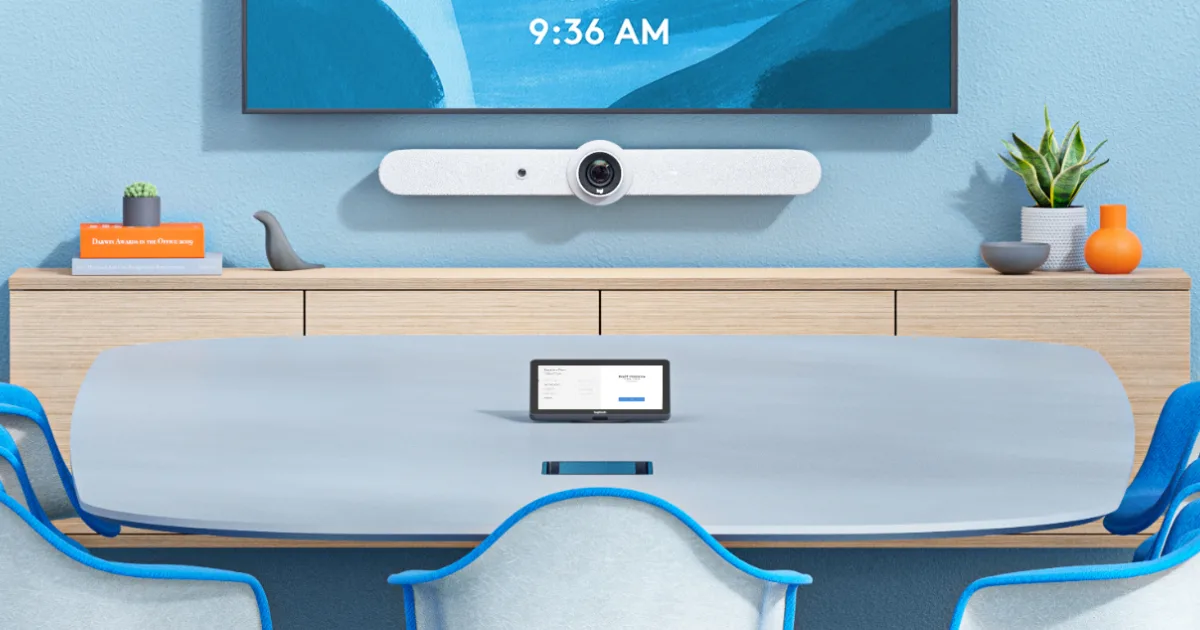
For video conferencing and collaboration spaces, we deploy Logitech solutions that deliver consistent, high-quality experiences. Whether it's a small huddle room or a large boardroom, Logitech's cameras, speakerphones, and all-in-one video bars are designed specifically for Microsoft Teams and other UC platforms.
These devices handle the technical complexity automatically—auto-framing to keep everyone in view, noise cancellation to eliminate background chatter, and one-touch meeting joins so your team doesn't waste 10 minutes fiddling with cables and settings. Your meetings start on time and run smoothly, which means less frustration and more productive collaboration.